Getting Started with Sortefi: Screen Any Market in Plain English
A stock screener should let you find setups as fast as you can describe them. Most don't — they hand you a wall of dropdowns and formulas and make you translate your idea into their language. Sortefi does the opposite: you write what you want in plain English, and it does the work.
This is a five-minute tour of what Sortefi is, how to use it, how to write prompts that return exactly what you meant, and how to push the result into TradingView.
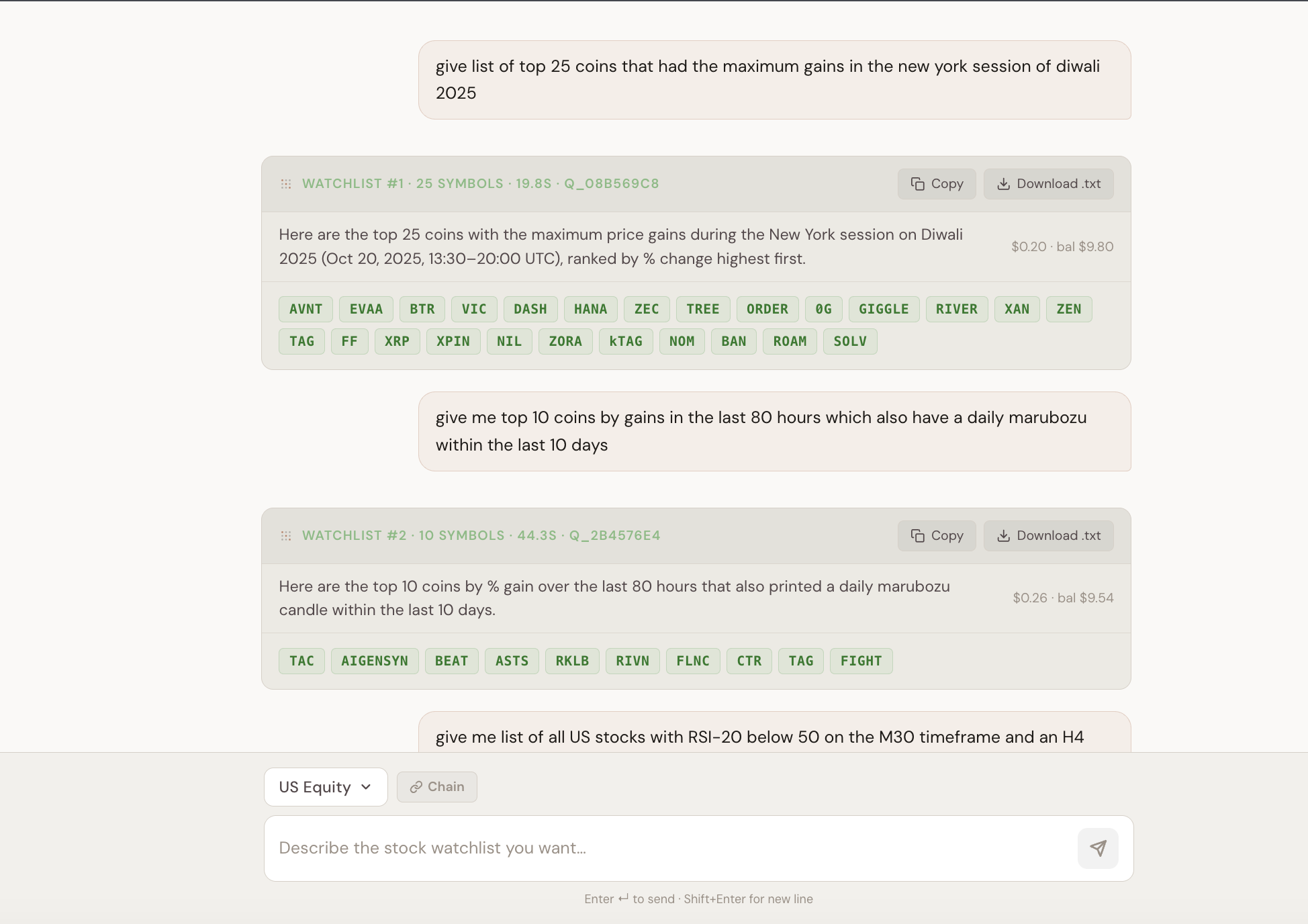
What Sortefi is
Sortefi is an AI-powered watchlist generator. You type a description of the setup you want — a condition, an indicator, a fundamental filter, or a combination of all three — and Sortefi scans live market data and returns the exact symbols that match, ready to export to your charting platform.
Under the hood it covers five live markets:
- Crypto Perps —~760 perpetual futures across Binance, Bybit & HyperLiquid — plus funding and open interest.
- US Equity —~3,300 stocks on NYSE, NASDAQ, AMEX and more, with a fundamentals snapshot.
- India Equity —Nifty 500 with intraday + daily price and full company fundamentals.
- Forex —66 curated pairs — majors, minors and emerging-market crosses.
- ETFs —~2,400 US-listed ETFs on price data.
Across those markets you get 110+ technical indicators, candlestick and chart patterns, fundamentals, and derivative data (funding, open interest) — on every timeframe from 1-minute up to monthly.
How to run your first screen
Pick a market, type your query, and read the result. That's it. The trick to getting a clean result the first time is to include four things when they matter:
- Market — US stocks, crypto perps, India stocks, forex, ETFs.
- Condition — the measurable part: RSI below 30, price above EMA 200, PE below 15.
- Timeframe — on H4, daily, weekly.
- Window or ranking — this week, last 30 days, top 20 by gain.
You don't have to include all four every time — but the more of them your query names, the more precisely Sortefi can answer.
A good prompt vs a bad prompt
The single biggest factor in result quality is how you phrase the request. A weak prompt is vague and unmeasurable; a strong one names the market and states its conditions as things that can be computed. Here's the difference in practice:
✗ Weak: “good stocks to buy”
✓ Strong: “US stocks with PE below 15 and ROE above 20% on daily”
“Good” isn’t measurable. Name the market and state conditions as numbers Sortefi can compute.
✗ Weak: “oversold coins”
✓ Strong: “crypto perps with RSI below 30 on H4”
“Oversold” needs an indicator and a timeframe. RSI < 30 on a stated candle is unambiguous.
✗ Weak: “cheap Indian stocks near their lows”
✓ Strong: “Nifty 500 stocks with PE below 20 and price within 10% of the 52-week low”
Turn vague words (“cheap”, “near lows”) into explicit thresholds.
✗ Weak: “volatile forex with high volume”
✓ Strong: “major forex pairs with the widest daily range over the last 30 days”
Forex has no reliable centralized volume — screen on price or volatility instead.
✗ Weak: “momentum breakouts”
✓ Strong: “top 20 US stocks by 1-month gain that closed above their 50-day high yesterday”
Add a ranking, a window, and a concrete breakout definition so the result is a finite, ordered list.
A few habits that make every prompt stronger:
- Name the market first — different markets have different data and timeframes.
- Include the candle timeframe whenever it matters (H1, H4, daily, weekly, monthly).
- Use plain comparison words: above, below, between, crossed above, near, rising, falling.
- For fundamentals, name the field directly: PE, PB, market cap, ROE, ROA, dividend yield, sector.
- When a word is ambiguous, be explicit (say RSI, not just “strength”; say outperformed SPY for relative strength).
Refine instead of starting over
Got a result that's close but too broad? You don't have to rewrite the whole query. Chaining lets you apply the next filter to a previous watchlist — scan broadly first (“US stocks with RSI below 40 on daily”), then narrow it (“of these, only ones with PE below 15”) without rescanning the whole market. Chained queries stay within the same market.
Export to TradingView
A watchlist is only useful if you can act on it, so every Sortefi result is TradingView-ready. Each symbol comes with its exchange prefix already attached:
| Market | Export line |
|---|---|
| Crypto Perps | BINANCE:BTCUSDT.P |
| US Equity | NASDAQ:AAPL |
| India Equity | NSE:RELIANCE |
| Forex | FX_IDC:EURUSD |
| ETF | AMEX:SPY |
You have two ways to move a list over:
- Copy — copies the result list to your clipboard to paste anywhere.
- Download — saves a
.txtfile you can import into TradingView as a watchlist.
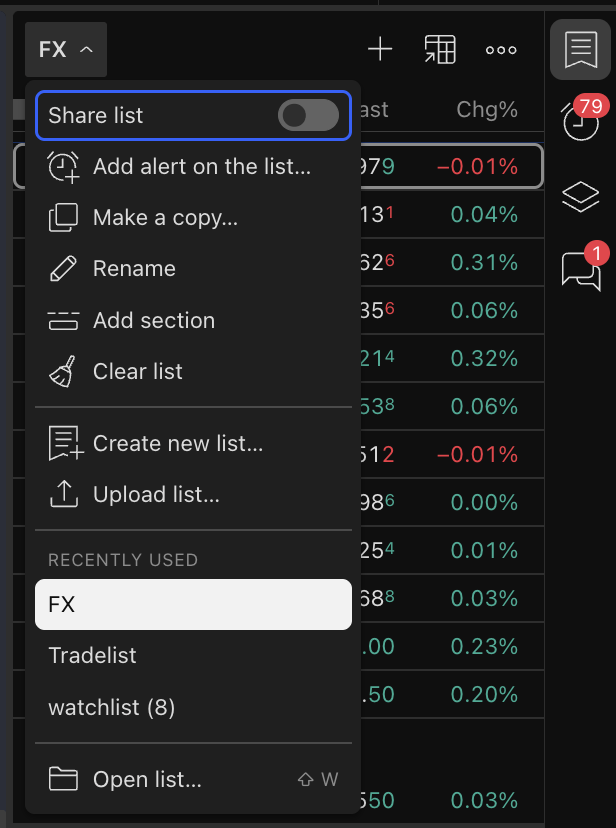
To import the file into TradingView:
- Open TradingView and open the watchlist panel.
- Open the watchlist menu and choose Upload list…
- Select the
.txtfile exported from Sortefi. - If TradingView asks, confirm the exchange prefix for any symbol.
Try it with a real idea
The fastest way to get it is to run one query. Bring the setup you actually trade — the specific one — describe it in a sentence, and see the watchlist come back.